
Just ran into this one,
Once trying to run the CU5 setup.exe /PrepareAD , the setup failed with an error: [02/07/2014 11:57:49.0192] [1] [ERROR] Active Directory operation failed on dc.domain.com. The object 'CN=Default,CN=OWA Mailbox Policies,CN=Exchange,CN=Microsoft Exchange,CN=Services,CN=Configuration,DC=domain,DC=com' already exists. [02/07/2014 11:57:49.0192] [1] [ERROR] The object exists.
Digging in the ExchangeSetup.log file, I’ve tried to identify the cause.
[02/07/2014 11:57:49.0192] [1] [ERROR] The following error was generated when "$error.Clear(); $policyDefault = Get-OwaMailboxPolicy -DomainController $RoleDomainController | where {$_.Identity -eq "Default"};
if($policyDefault -eq $null) { New-OwaMailboxPolicy -Name "Default" -DomainController $RoleDomainController } " was run: "Microsoft.Exchange.Data.Directory.ADObjectAlreadyExistsException: Active Directory operation failed on dc.domain.com. The object 'CN=Default,CN=OWA Mailbox Policies,CN=Exchange,CN=Microsoft Exchange,CN=Services,CN=Configuration,DC=domain,DC=com' already exists. ---> System.DirectoryServices.Protocols.DirectoryOperationException: The object exists.
So I’ve tried to reproduce the test manually using the same command in the setup:
Get-OwaMailboxPolicy -DomainController $RoleDomainController | where {$_.Identity -eq "Default"}And the result was indeed $null .. which made no sense here… because it does exists, as the error states - the object ‘CN=Default,CN=OWA Mailbox Policies,CN=Exchange,CN=Microsoft Exchange,CN=Services,CN=Configuration,DC=domain,DC=com’ already exists.
Then I’ve noticed that the CN was “default” with lower “d” … although the Where-Object and -eq should be case insensitive, the check failed…
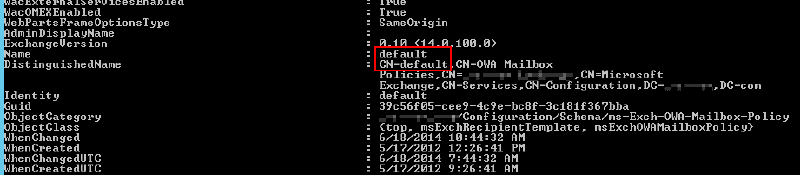
So, I’ve modified the value to be “Default” with capital “D”:
Set-OwaMailboxPolicy -Identity default -Name Default
that did the trick :) and the setup.exe /PrepareAD was successful.
ilantz